
No products in the cart.

Type
Digital Key
Platform
Steam
Region
Global
Delivery
Instant Delivery
G-Care
30 Days
Works on
PC
As Dusk Falls (PC) – Steam Key – GLOBAL
In Stock
د.إ14.73
In Stock
Payment processing fees may apply
As Dusk Falls is a narrative-driven interactive drama developed by INTERIOR/NIGHT and published by Xbox Game Studios. Set in 1998 Arizona, it follows two families pulled into a robbery gone wrong, told through a hand-painted, motion-comic art style across a decades-spanning story. The game supports single-player and up to eight-player local or online co-op, with player choices shaping the narrative’s branching outcomes.
Perfect Match with

Overview
As Dusk Falls is an interactive drama from INTERIOR/NIGHT that follows two families whose lives collide after a robbery goes wrong in a small Arizona town in 1998. Told across two intense books with a hand-painted, motion-comic art style, the story branches based on the choices you make, with every decision shaping who these characters become and how their thirty-year saga unfolds. It’s built for players who want a cinematic, choice-driven narrative they can replay to uncover different outcomes, alone or with friends.
What’s included / why buy
- Full access to As Dusk Falls on Steam for PC, redeemable worldwide with no regional restrictions.
- A complete branching narrative spanning two books and multiple playable perspectives across the Walker and Holt families.
- Couch and online co-op for up to eight players, with choices made via the companion app on phone or tablet.
- A distinct hand-painted visual style that plays out like a motion graphic novel rather than a traditional 3D game.
- High replay value, since different decisions unlock alternate scenes and outcomes for the characters.
- Instant digital delivery of a genuine Steam key at a lower price than standard retail.
Important information
- This key activates on Steam and is valid worldwide (GLOBAL region) — no regional restrictions apply.
- This purchase is non-refundable once the key has been revealed.
How to Redeem Your Steam Game Key
A simple guide to activating your new game on Steam
If you have purchased a Steam game key from Gate2Enter, this article will show you how to redeem it. The process is quick and works the same way for most games on Steam.
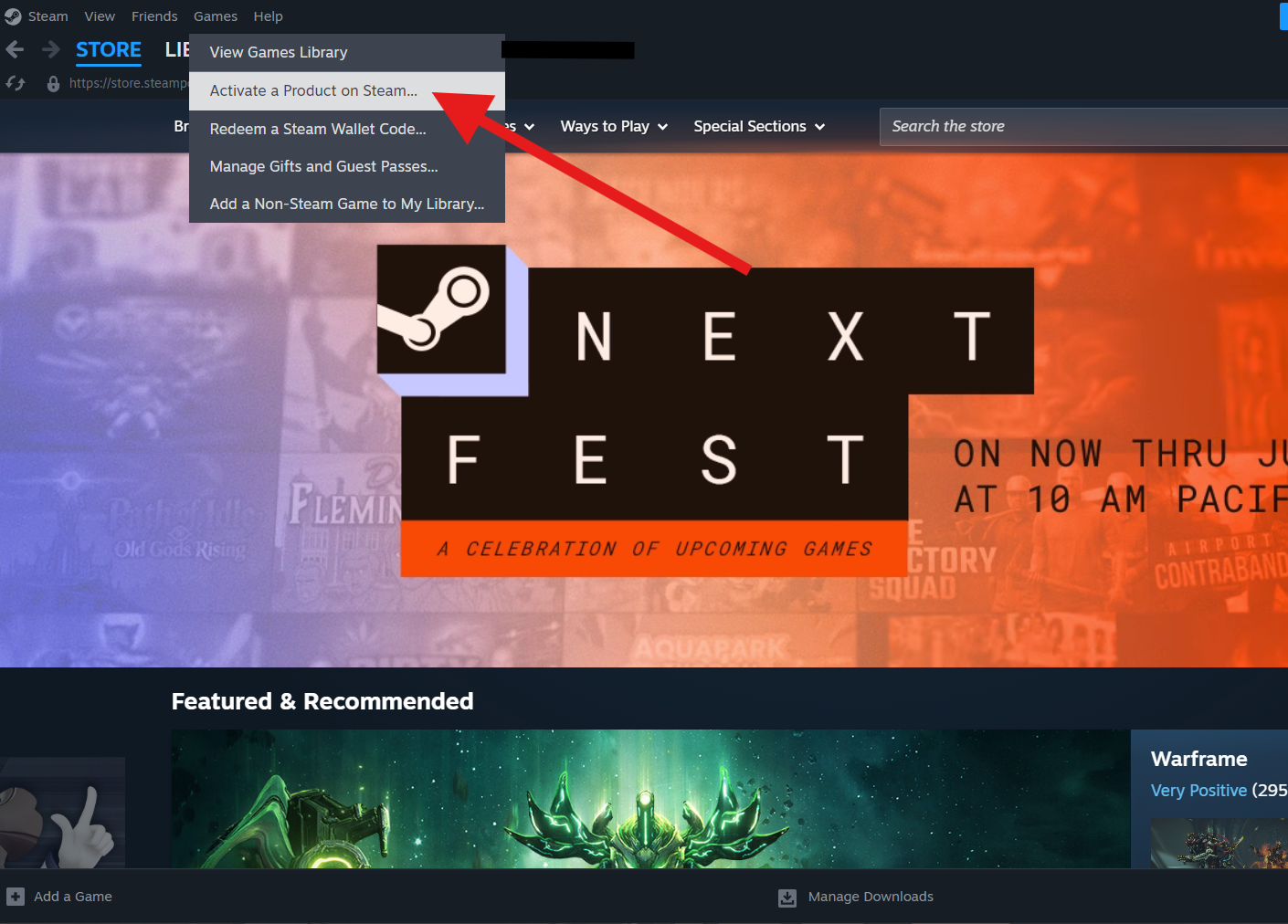
How to redeem your key on desktop:
- Open the Steam application and log in to your account.
- Click the Games menu at the top of the screen.
- Select Activate a Product on Steam.
- Click Next on the welcome screen.
- Read and accept the Steam agreement, then click Next again.
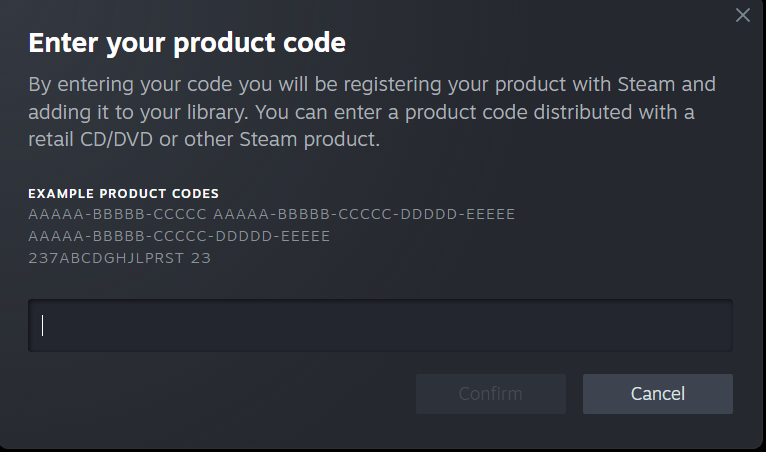
- Enter the product code you copied from Gate2Enter.
- Click Next to confirm and complete the activation.
How to redeem your key on the Steam mobile app:
- Open the Steam app and log in to your account.
- Tap the menu icon in the top left corner.
- Select Games, then tap the plus icon.
- Choose Activate a Product.
- Enter the product code and follow the on-screen steps to finish.
Once the activation is complete, the game will be added to your Steam library. You can install it straight away or at any time later.
A few things worth knowing:
- Each key can only be redeemed once.
- The game must be available in your Steam account’s region to activate successfully.
- Some keys are tied to a specific country, so always check the product listing before purchase.
Additional information
| Type | |
|---|---|
| Platform | Steam |
| Genre | Adventure |
| Region | Global |
| Delivery Time | Instant Delivery |
| Game Mode | Co-operative, Multiplayer, Single Player |
| G-Care | 30 Days |
| Works On | PC |
Specifications
Developer
INTERIOR/NIGHT
Publisher
Xbox Game Studios
Release date
July 2022
Age rating
ESRB Mature 17+
System Requirements
MINIMUM
OS: Windows 10 64-bit
Processor: Intel Core i5-4460 or AMD FX-6300
Memory: 8 GB RAM
Graphics: NVIDIA GeForce GTX 760 or AMD Radeon R7 260x
Storage: 30 GB
RECOMMENDED
OS: Windows 10 64-bit
Processor: Intel Core i7-4770 or AMD Ryzen 5 1600
Memory: 16 GB RAM
Graphics: NVIDIA GeForce GTX 1060 or AMD Radeon RX 580
Storage: 30 GB
Add a review
You must be logged in to post a review
Log In
Related products


SALE
Up to
49% Off
49% Off
SALE


EA Play – Xbox Live Key (Global)
Select options
This product has multiple variants. The options may be chosen on the product page
SALE

Reviews
There are no reviews yet