
No products in the cart.
Type
Digital Key
Platform
Steam
Region
Global
Delivery
Instant Delivery
G-Care
30 Days
Works on
PC
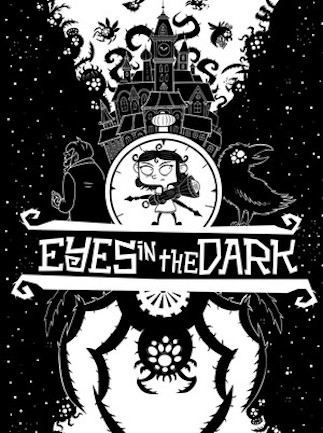
Eyes in the Dark (PC) – Steam Key – GLOBAL
In Stock
CHF3.94
In Stock
Payment processing fees may apply
Eyes in the Dark is a 2D action roguelite from Under the Stairs and Kontrast, set inside the ever-shifting Bloom Manor where Victoria Bloom uses a flashlight, slingshot, and an arsenal of tinkered gadgets to drive back the darkness and rescue her grandfather.
Perfect Match with

Overview
Eyes in the Dark Steam key unlocks a stylish “roguelight” twin-stick platformer where Victoria Bloom returns to her grandfather’s haunted estate armed with little more than a flashlight and a slingshot. Developed by Under the Stairs and Kontrast, the game pits you against waves of shadowy creatures across an ever-changing Bloom Manor, blending Saturday-morning cartoon charm with the bite of a true roguelite. It’s a tight, replayable adventure built for players who enjoy run-based action with meaningful upgrades between attempts. All sales of this Eyes in the Dark Steam key are final and non-refundable once the code is revealed.
What’s included / why buy
- Full base game of Eyes in the Dark for PC, activated on Steam and tied permanently to your account once redeemed.
- A complete single-player roguelite campaign starring Victoria Bloom as she fights to save her grandad Victor from the darkness consuming Bloom Manor.
- Run-based progression with new gadgets, weapon modules, and flashlight upgrades that change how each attempt plays — including perks paired with deliberate weaknesses for risk/reward builds.
- Item synergies through tinkering, from burning Matches to a chaining Electricity Bulb, plus huge Guardian boss fights at the end of each region.
- 34 Steam Achievements, Steam Trading Cards, Steam Cloud saves, and full controller support — the Eyes in the Dark Steam key plays great on Steam Deck and traditional desktops alike.
- GLOBAL region — activates worldwide on a standard Steam account, with interface and subtitles in English, French, Italian, German, Japanese, Simplified Chinese, and Latin American Spanish.
- Single-use code: once revealed, the key cannot be returned, refunded, or transferred to another account
How to Redeem Your Steam Game Key
A simple guide to activating your new game on Steam
If you have purchased a Steam game key from Gate2Enter, this article will show you how to redeem it. The process is quick and works the same way for most games on Steam.
How to redeem your key on desktop:
- Open the Steam application and log in to your account.
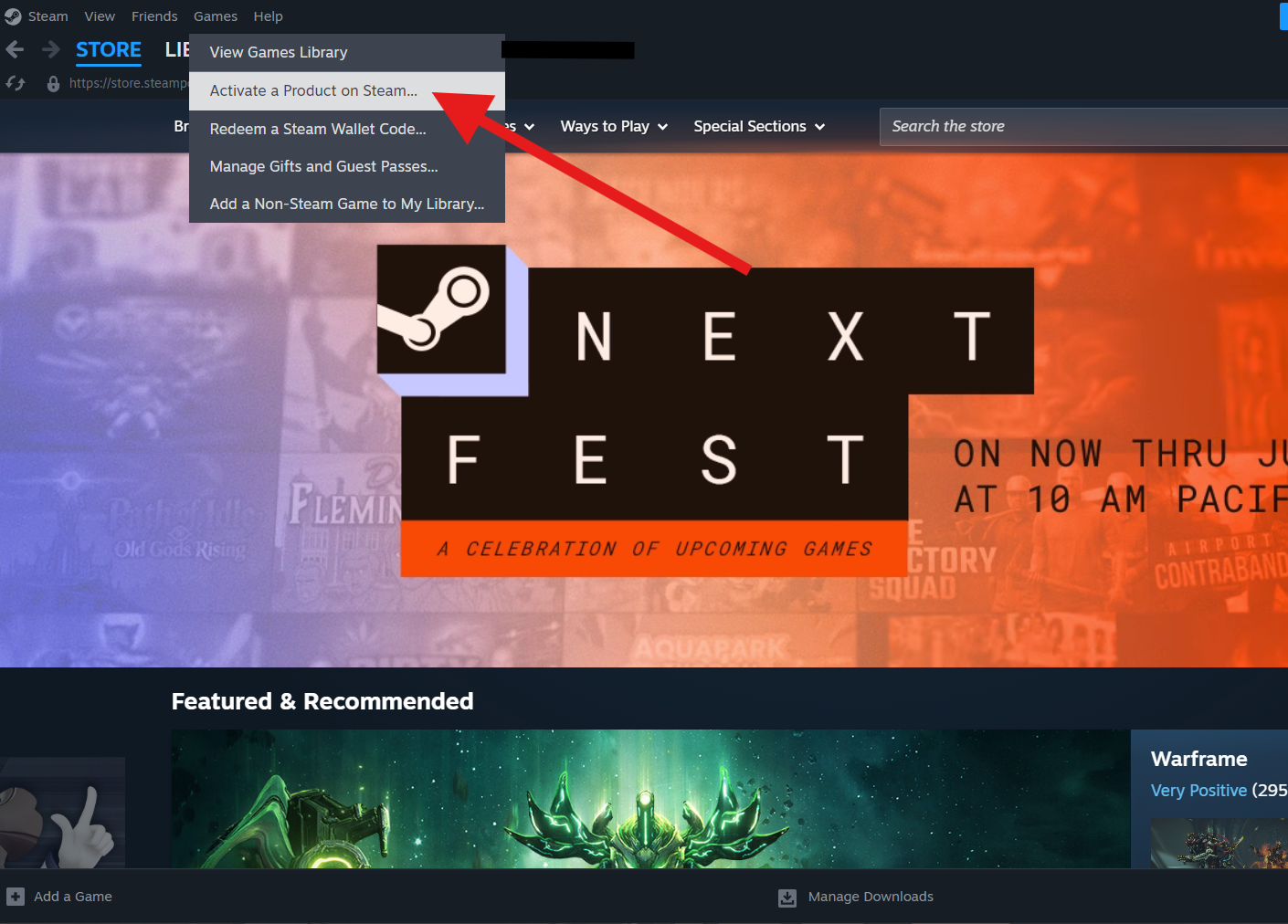
- Click the Games menu at the top of the screen.
- Select Activate a Product on Steam.
- Click Next on the welcome screen.
- Read and accept the Steam agreement, then click Next again.
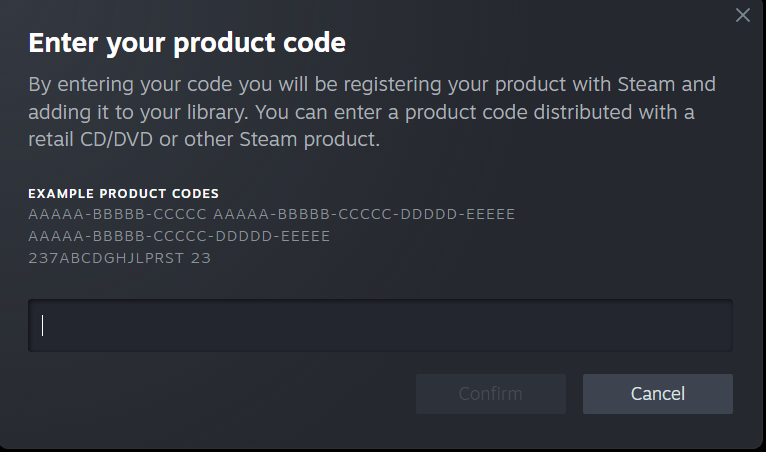
- Enter the product code you copied from Gate2Enter.
- Click Next to confirm and complete the activation.
How to redeem your key on the Steam mobile app:
- Open the Steam app and log in to your account.
- Tap the menu icon in the top left corner.
- Select Games, then tap the plus icon.
- Choose Activate a Product.
- Enter the product code and follow the on-screen steps to finish.
Once the activation is complete, the game will be added to your Steam library. You can install it straight away or at any time later.
A few things worth knowing:
- Each key can only be redeemed once.
- The game must be available in your Steam account’s region to activate successfully.
- Some keys are tied to a specific country, so always check the product listing before purchase.
Additional information
| Type | |
|---|---|
| Platform | Steam |
| Genre | Action |
| Region | Global |
| Delivery Time | Instant Delivery |
| Game Mode | Single Player |
| G-Care | 30 Days |
| Works On | PC |
Specifications
Developer
Under the Stairs, Kontrast
Publisher
Under the Stairs
Release date
July 2022
Age rating
ESRB Everyone 10+ (Fantasy Violence)
System Requirements
MINIMUM
OS: Windows 10 64-bit
Processor: Intel Core 2 Quad Q9500 or AMD Phenom II X4 840
Memory: 4 GB RAM
Graphics: NVIDIA GeForce GT 520 1 GB / AMD Radeon HD 5570 1 GB / Intel HD Graphics 4400
Storage: 800 MB available space
RECOMMENDED
OS: Windows 10 64-bit
Processor: Intel Core i3-2100 or AMD FX-4300
Memory: 4 GB RAM
Graphics: NVIDIA GeForce GT 730 1 GB / AMD Radeon R7 240 1 GB / Intel UHD Graphics 530
Storage: 800 MB available space
Add a review
You must be logged in to post a review
Log In
Related products
Discord Nitro 2 Server Boost Gift Code – All User (Global)
Select options
This product has multiple variants. The options may be chosen on the product page
SALE

SALE

LinkedIn Premium Career – All Users (Global)
Select options
This product has multiple variants. The options may be chosen on the product page


Steam Gift Card (USA)
Select options
This product has multiple variants. The options may be chosen on the product page
SALE
Reviews
There are no reviews yet